Cracked Screens and Display Issues
User’s Guide to Repair
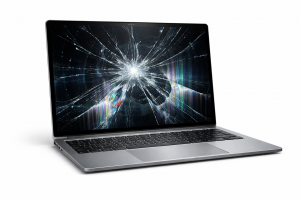
For Detroit residents, a broken laptop screen is more than just a minor inconvenience; it can bring work, school, and entertainment to a grinding halt. Physical damage, like a shattered display or a malfunctioning LCD panel, is one of the most frequent reasons people their laptops serviced.
The vulnerability of laptop screens is high. Accidents happen—dropping the laptop, closing the lid with an object on the keyboard, or pressure in a backpack can all cause a crack or internal failure. Symptoms can range from minor cracks and dead pixels to a completely black or distorted display.
The Repair vs. DIY Dilemma
When faced with a broken screen, Detroit users have two primary options: professional repair or a do-it-yourself (DIY) fix.
- Professional Repair: The most reliable and recommended option for most users. MRTECHFIXES offers expertise and often provides warranty assistance. Repair costs for a standard LCD screen in 2025 typically range from $99 to $500 depending on the laptop’s brand, model, screen type (touchscreen, OLED, etc.), and the extent of the damage. While more expensive than DIY, this option ensures correct installation and avoids further damage.
- DIY Repair: For users with technical skills, buying a replacement screen online can save money. Replacement screens from manufacturers or third-party sellers range from $50 to $300. However, this path carries risks, including voiding warranties, incorrect installation, or accidental damage to other components.
Schedule a Consultation
What to Expect from MRTECHFIXES
An expert computer repair specialist will typically:
- Diagnose: Assess the damage to confirm only the screen is affected.
- Quote: Provide a detailed estimate based on the specific laptop model and parts needed.
- Replace: Carefully remove the damaged panel and install a new one, ensuring all connections are secure.
- Test: Verify the new screen functions correctly.
Prevention Tips
To avoid future screen trauma, consider a padded laptop sleeve, avoid placing heavy objects on your device, and always ensure the keyboard is clear before closing the lid. If the screen is broken, an immediate temporary solution is to connect your laptop to an external monitor or TV via an HDMI cable to continue using it while awaiting repair.